Frequently asked questions

You’ve got questions. We’ve got answers.

How do I access the course?

To access the course you need to navigate to the 'Products' dashboard in the upper right corner of your screen (next to your avatar).

What if I don't see my course listed?

You clicked on GET STARTED but don't see your course listed in the products dashboard. This is common.

You have probably joined the Design Sketching community or have enrolled to another course prior to enrolling to your new course.

To get access to your new course you will need to switch to another community plan by following these steps:

Step 1

First, log into your customer account. After you've logged in, click on your profile picture and select Settings:


Step 2

Scroll down until you find the Billing section. Click on Edit next to Community.


Step 3

Click on Cancel plan.

Step 4

Return to the GET STARTED lesson in the appropriate course and click the START-button again. Select 'Get now' on the next page.

That's it! When you view your products dashboard again you should now see the course listed.

How do I access the Private Course Community Topics?

If you are not seeing the Private Course Community Topics in the sidebar of the community page follow these instructions to get access.

If you were already a member of the Design Sketching Community or another course community before enrolling to a new course you will need to switch plans:

Step 1

First, log into your customer account. After you've logged in, click on your profile picture and select Settings:


Step 2

Scroll down until you find the Billing section. Click on Edit next to Community.


Step 3

Click on Cancel plan and then return to the course.

Step 4

Open the course lesson about the community again. Click the button with the link to the course community and select 'Get now'.

That's it! When you view the community page you should now see the Private Course Community Topics show up in the sidebar.

What's the difference between 'course' and 'community'?

The course is where you will find all content in the form of lessons including videos, assignments and other recourses.

The community is a special area on the platform dedicated to discuss specific topics.

Why do I automatically become a member of the Design Sketching Community?

The Design Sketching Community is a special area on the platform dedicated to discuss specific topics.

For a course we use that same area to discuss topics (in private) related to the course as well as to review and assess your work.

To make this possible we need to add you to the Design Sketching Community first.

Note that the Design Sketching Community is open for anyone interested in design sketching and not just limited to course members. Some pages are set to 'Public' which means they can also be viewed without login in to the community.

However, within this community you will find a series of Private Topics that are only visible to the members of a specific course:
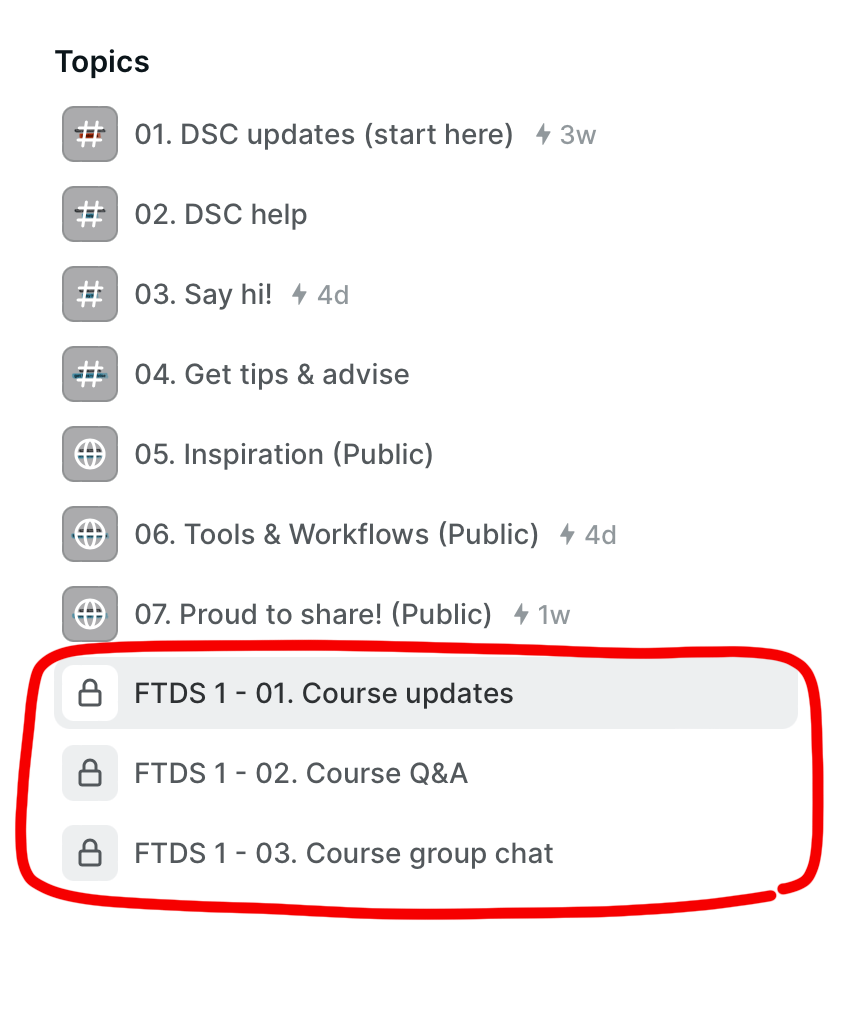
This is where you can upload your work for review and assessment, and discuss anything related.

Please note that these private topics are only visible to the members of that specific course.

Anything you post there will only be visible to your peers and the course staff.

You will find the community in the upper right corner of your screen.